
What is my web server IP?

IP address for the server where your domain name is hosted on has been send to you in the "Account Activation Email" upon your order and payment confirmation. If you have forgotten on the IP Address, you may always find it out using the below procedure:

1. Go to "Start" of your local Windows
2. Click on "Run"
3. Type in "ping -t yourdomain.com" and hit on "Enter" button on your keyboard
4. You shall received a response with your IP address.

C:\>ping yourdomain.com

Pinging yourdomain.com [72.188.155.255] with 32 bytes of data:


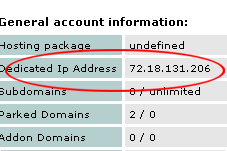
For Linux hosting clients using cPanel, you may find your web server IP address inside your cPanel as well, see below:
  • 4 Users Found This Useful
Was this answer helpful?

Related Articles

How to create new FTP account in Cpanel?

Click here to View step by step video

Can the hosting server support Perl scripts? I couldn't find the path to Perl directory.

Yes, it can. If you log in to your Cpanel, you can find the Path to PERL on the left section. In...

I cannot login to Cpanel, email, webmail, ftp or view my website but I have no problem viewing other websites. Please help.

Are you using Internet connection with dynamic IP? If yes, please disconnect and reconnect again...

Does Surf7.net Provide Secure Shell Access (SSH)?

We provide remote shell access to our Linux hosting server via SSH. Our Linux servers support...

Powered by WHMCompleteSolution