
View your account resource usage from cPanel

Since we have perform custom kernel upgrade start from February 2011, you may now view your site's resource usage in term of Memory, CPU and Concurrent User that used/access to your site from cPanel.

As a result, we have applied the following resource limit on our shared server.

- CPU: 15%
- Concurrent Connections: 30
- Memory: 384MB

Below is the sample screenshot for cPanel X3 themes result.

cPanel Status:
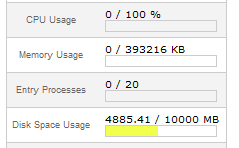
cPanel Status

To get the detailed resource usage, please use the step as below.
detailed resource usage

Basically, you may click on the icon named Resource Usage from Logs section and you may hit the [Details] link and you will be able to generate the resource quota from your site.
  • 2 Users Found This Useful
Was this answer helpful?

Related Articles

What is my web server IP?

IP address for the server where your domain name is hosted on has been send to you in the...

How to create new FTP account in Cpanel?

Click here to View step by step video

Can the hosting server support Perl scripts? I couldn't find the path to Perl directory.

Yes, it can. If you log in to your Cpanel, you can find the Path to PERL on the left section. In...

I cannot login to Cpanel, email, webmail, ftp or view my website but I have no problem viewing other websites. Please help.

Are you using Internet connection with dynamic IP? If yes, please disconnect and reconnect again...

Powered by WHMCompleteSolution